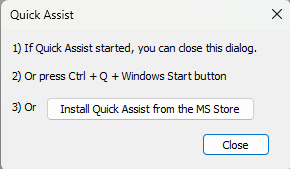
When you execute the Quick Assist command, TPC always displays this dialog.
Windows 10 & 11
Quick Assist comes pre-installed on Windows 10. However, in Windows 11, it is available only from the Microsoft store where you can install it. Once installed, it is then available directly from your computer.
1) If Quick Assist started, you can close this dialog
If Quick Assist starts (you see the Quick Assist dialog), you can close this dialog and continue using Quick Assist.
2) Or press Ctrl + Q + Windows Start button
To run Quick Assist any time, press Ctrl + Q + (the Windows Start button)
If Quick Assist doesn't run when you do this, you will need to install it.
3) Or [ Install Quick Assist from the MS Store ]
Choose this option to install Quick Assist on your computer. After you have installed it, you can choose Open or press Ctrl + Q + (the Windows Start button).