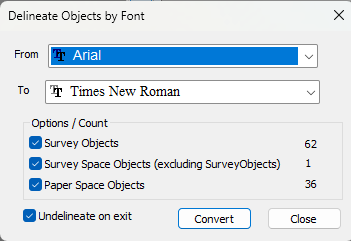
Navigation: Drawings > Working With a TPC Drawing > Using Fonts > Delineating Fonts > Delineate Font Objects command Use this command to open the Delineate Objects by Font dialog and change the fonts used by selected drawing objects. This dialog has the same functionality as the Convert Fonts dialog. Accessing Font Tools These font tools are available in both the Drawing View and the Drawing Data Manager. See Accessing Font Tools. Related Topics Convert Fonts Dialog Editions Personal, Premium, Professional Copyright © 2026 Traverse PC, Inc.