|
To select a picture, position the cursor over the edge of the rectangle that circumscribes the picture. A picture can only be selected at its edges.
•Right click the picture and choose Properties from the pop-up menu.
•Choose Edit. TPC will open your picture editing program and load the picture.

•Make the changes you want, then save the picture back to its file.
•Close your picture editing program. You will return to the Picture Settings dialog.
•Choose OK. TPC will reload the picture object from the edited picture file.
Specifying a Picture Editor
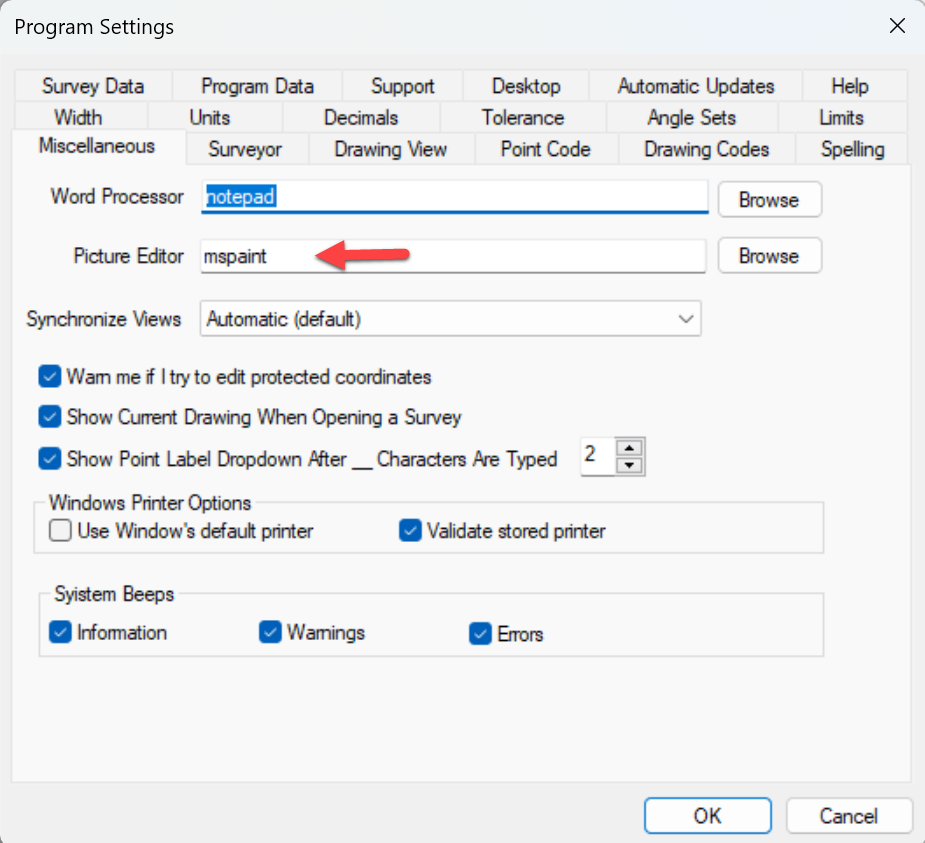
From the TPC Desktop, choose Tools | Program Settings | Miscellaneous and enter the name of your picture editor in the Picture Editor field.
TPC uses ‘mspaint’ as the default editor because it ships with Windows, but you can use any editor capable of editing JPG, GIF, TIF, PNG, EMF, BMP or ICO file types.
Related Topics
Pictures
Editions
Personal, Premium, Professional
|

