|
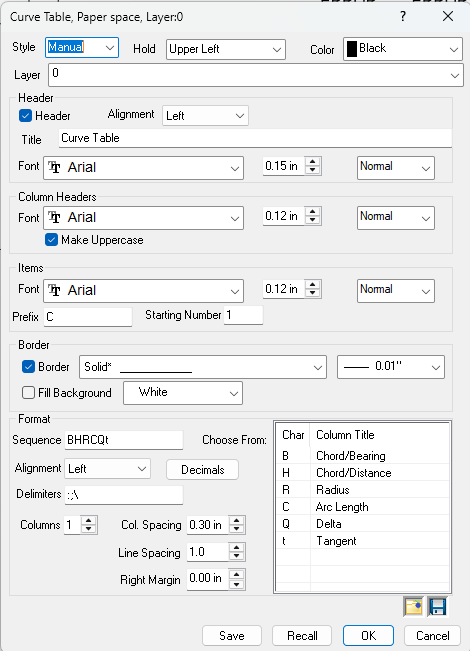
Any curve label in a drawing can be placed in a Curve Table where each row represents a labeled curve in the drawing.
Each drawing can contain only one curve table. For other drawing tables see Drawing Tables.
|
Curve
|
Horiz Dist
|
Bearing
|
Radius
|
Record Data Per CSF14356
|
<- column headings
|
|
C1
|
14.56
|
N45°30'15"E
|
100.00
|
[14.00/ N45°00'00"E]
|
<- table item
|
In this line table, C1 is the reference for the curve listed on this row of the table. The actual curve in the drawing is labeled with the 'C1' reference instead of the curve data itself. Curve tables use the prefix 'C' to reference table items.e. As you move the cursor over a table item the status bar will display Table Item followed by the reference label to indicate which table item the cursor is over.
Table Styles
Table styles determine how items are added to a table. The style of a curve table can be All, Manual. You can start with one style, like All and have TPC add the appropriate table items, then switch the table to Manual and fine tune the selection of items.
All Style
With this style, all the labeled curves in the drawing are added to the curve table. Remember that a curve has to be labeled before it can be added to a table.
Manual Style
For more control over curve labels, choose the Manual Style. When a table style is set to Manual, you can append curve labels to the curve table in the order you want them.
•To add a curve label to its table, right click the label and choose Append to Table. TPC will compute the next table reference, replace the line label with the computed reference and append a new table item to the appropriate table. If you choose to append a label and the curve table doesn't exist, TPC will prompt you to create it and set its style to Manual..
•To remove a table item, right click the table item and choose Remove From Table. TPC will remove the table item, renumber the reference labels as needed to insure that all label references are sequential and replace the reference label on the drawing with the original line label.
Adding Record Data to a Curve Table
TPC lets you add your own information to a table. This feature is indispensable when you need to include record data in the table. See Editing Table Items.
Decimal Places
The decimal places used for bearings/azimuths and distances in the table are determined by the current values in Tools, Program Settings, Decimals. After you change these decimal settings, you will need to regenerate the drawing to update the table.
TPC also uses these settings when you create a new table or open a drawing with a table in it.
Adding Extra Margin
You may find certain fonts will extend past the border of your point table.
An easy way to fix this is by adding some right margin to give your point table some extra width.
Related Topics
Drawing Tables
Editions
Premium, Professional
|

