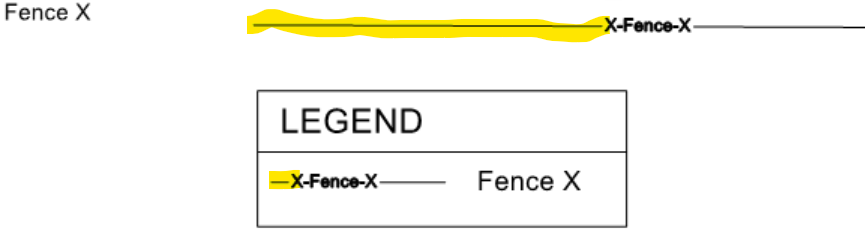
In order to fit line types with line patterns that are longer than the column width of the legend, TPC creates unique, hidden, line types just for the legend, and reduces the pattern width of the line type.
The example below shows the Fence X line type added to a legend. In the drawing, the first dash in the pattern is long. In the legend however, it is shortened in order to fit the line type in the legend.
Exporting Line Types with Longer Patterns to CAD
When exporting a legend to CAD, TPC evaluates each line type included in the legend, and where possible, exports it's unique legend line type to CAD so that can draw the legend well. If you explore the line types in a DWG file exported from TPC, you will see line types with _LEGEND appended to them. These are the legend line types TPC has created.
•if a line type has embedded text or symbols, or has just dashes and dots, TPC will create a legend line type.
•if the line type has embedded, blocks, TPC won't create a legend line type.
If a legend line type is not written to CAD, that line type definition used in the drawing will be the same line type definition included in the legend. If that line type has long pattern length, CAD may draw it as a Continuous line in the legend. In this case, you would need to manually create a unique line type for that line to use in the legend.