The Drawing Data Manager has a Warnings section that identifies any drawing objects that may have issues that cause them not to draw properly or even not to draw at all.
DDM Warnings (3:51) Beginning with TPC 2023, the Drawing Data Manager includes a Warnings section and lists drawing objects that may have issues.
Warnings Branch
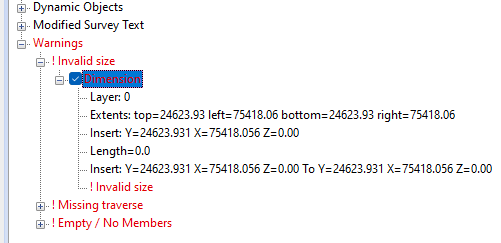
In the Drawing Data Manager, expand the Warnings node as shown here then expand any warnings sub-branch, like ! Invalid size.
Each drawing object with an issue will be included.
Expand an object to see what the issue is.
The Dimension shown here, has zero length because the Insert and end points are the same.
Finding Objects With Warnings
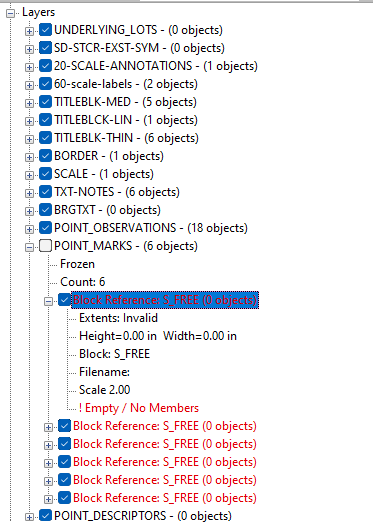
You can also see objects with warnings when you expand other branches, like the layers branch expanded here.
Objects with warnings are displayed in red.
Once you expand an object with a warning, TPC includes the warning at the bottom of the object information.
The Block Reference expanded here is empty, because its filename is missing. You can double click the Block Reference item and browse to the correct block file to fix it.
Deleting Objects with Warnings
To delete an object with a warning, select the object and choose Tools, Delete Object. You can also delete all the warnings under a Warnings Sub-branch. See Deleting Warning Objects.
When you delete an object from the Warnings section, TPC locates the object in the drawing and deletes it from its layer or group.
There is no Undo for deleting objects from the Warnings section.
Warning Types
TPC issues warnings for a number of reasons and includes the warning with the object in the form ! [warning message].
Each warning type has its own Sub-branch under Warnings, so it is easy to identify other objects with the same warning issue.
! Missing traverse
This object is missing its associated traverse. Line labels, lot labels are examples of labels that associated with a traverse. If that traverse is missing, that label can't function properly.
If you delete this warning, TPC will try to remove these objects from the drawing, cleaning it up.
! Missing reference
This object is missing an important reference. A picture may be missing a picture file and a blockreference may be missing a block file.
! Not on page
The object is not on the current drawing page.
TPC tries to determine if any part of the object may still appear in the drawing, but sometimes relies just on the object's insert point.
You can move some objects onto the page by specifying the insert position in it's Properties dialog.
! Empty / No Members
Text objects with no text and group objects with no members will give this warning.
Blockreferences may be included with this warning if the block file they reference is unavailable. See Display Missing Blocks / Pictures.
! Invalid size
This object has a negative or zero size, like a text object with a height of zero. Or, this object is too big to fit on the page. Some raster images may issue this warning even though they have been cropped to fit the drawing.
! No height or width
This warning is issued for any drawing object that doesn't have a height or width after TPC computes it.
! Insert point is 0,0
TPC warns you about any object with a 0,0 insert point, even though you may, at times, choose to position an object here.
A 0,0 inserted position often indicates that the object's position has not been specified or could not be determined.
! Invalid
The object is invalid for some reason that is not specified otherwise. Expand the information about the object or right-click it and choose Properties.