|
Miscellaneous settings for the legal report
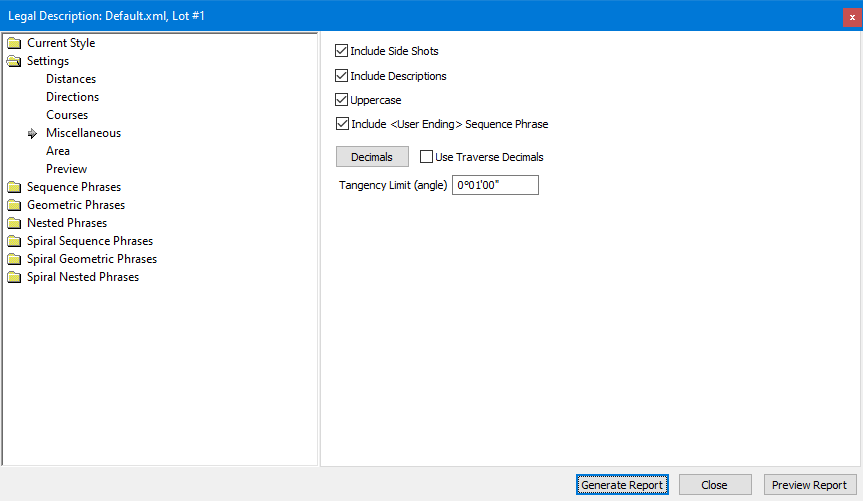
Include Side Shots
Turn on this option to include references to the side shots in the legal description. Side shot references follow the call to the point as in ', said point bears N4°02'19"E 288.062 from a 20" Oak;'.
A side shot must have a point description to be included. Side shots without point descriptions are not referenced.
Include Descriptions
Turn on this option to include point descriptions in the legal description such as ' thence N0°00'01"E for 90.984 Feet to a 5/8" Rebar;' where 'to a 5/8" Rebar' was added to the call.
Uppercase
Write the legal description all in upper case letters.
Include User Ending Phrase
Tag this to include the ending phrase in the legal report
Decimals
This button will let you change the decimal precision of the report. Decimals are controlled locally in TPC by the view, report or drawing you are working on. See Decimals. The decimal settings you select here affect only legal descriptions.
Use Traverse Decimals
Tag this to use the Traverse View Format decimals for this traverse.
Tangency Limit (angle)
Enter the angular difference at which two directions are considered tangent (default = 1 minute).
There are lots of reasons why a tangent curve or spiral may not be exactly tangent mathematically, yet considered to be tangent for the sake of a legal description. This limit lets you relax the constrains on tangency if you choose.
Include Phrase Keys
When Previewing a report the phrase keys will be included and colored in the Report View
Bold Place Holder Values
When Previewing a report the values replaced by phrase keys will be bolded in the Report View
Phrase Key Color
When Include Phrase Keys is tagged this color is used to mark the phrase keys in the Report View
Related Topics
Legal Description Distance Settings Dialog
Legal Description Direction Settings Dialog
Legal Description Courses Settings Dialog
Legal Description Style Dialog
Legal Description Area Settings Dialog
Legal Description Phrase Dialog
Legal Description Dialog
Editions
Personal, Premium, Professional
|

