|
If necessary, you can edit the values used to compute the ellipse for a CRS. The values you enter or accept from this dialog are copied into the current CRS and used for all computations in the survey's Coordinate Reference System (CRS).
Predefined Ellipses
TPC ships with a number of ellipses already defined. These include common ones like GRS80 and WGS84. These predefined ellipses can not be modified in this dialog. However, you can recall one of them, change the parameters then create a new ellipse to hold them. This new ellipse is added to the UserEllipse.dat file found in the program data folder.
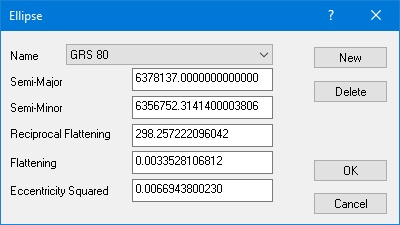
Name
Enter the name you wish to give the ellipse. This is just for your reference and does not affect the computations.
When you select an ellipse from the list, two things happen.
1.TPC copies the parameters stored with that ellipse into the dialog. If you have modified any of these parameters, your changes will be lost.
2.If you created a new ellipse, you are allowed to edit it until you select another ellipse from this list. So selecting an ellipse cancels the ability to edit a newly added ellipse.
Semi-Major, Semi-Minor, Reciprocal Flat, Eccentricity Squared
Enter the ellipse values. Other ellipse values that are dependent on a value you enter are recomputed and displayed for you.
New
Create a new ellipse. You can then enter the ellipse name and all the parameters.
Initially, TPC copies the current ellipse parameters to the new ellipse. However, you can continue to modify these parameters until you either close the dialog or select another ellipse from the list.
Delete
Delete the selected ellipse from the UserEllipse.dat file.
OK
Accept the changes and return. If you are transforming a survey, the target ellipse values are stored with the survey in the TRV file. All future transformations between grid and geodetic positions will be based on these ellipse values.
When you choose OK, TPC also updates the ellipses stored in the UserEllipse.dat file found in the program data folder. If you created a new ellipse, it will be added to this file.
If you modify any ellipse parameters and choose OK, TPC will tell you that they do not match any of the existing ellipses and ask you to create a new ellipse to hold them. TPC will then continue as if you had selected the New button. Once you have created a new ellipse to hold the ellipse parameters, you can reselect OK to leave the dialog.
Cancel
Closes the dialog without modifying the ellipse values of the current CRS.
Ellipsoid Parameters
|
Datum
|
Ellipsoid
|
Semi-Major (m)
|
Reciprocal Flattening
|
|
NAD 27
|
Clark 1866
|
6378206.4
|
294.9786982
|
|
NAD 83
|
GRS 80
|
6378137.0
|
298.257222101
|
|
WGS 84
|
WGS 84
|
6378137.0
|
298.257223563
|
Related Topics
Coordinate Transformations
Editions
Premium, Professional
|

