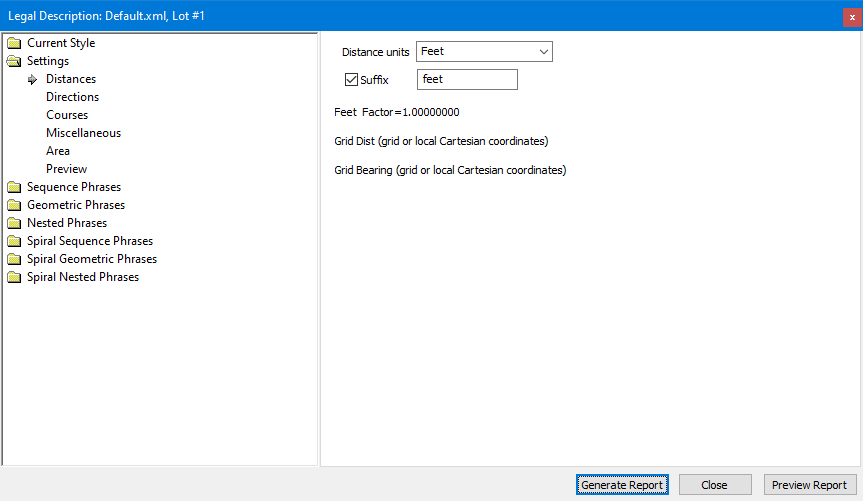
Legal description settings determine the formatting to use for directions, lengths, units, decimals, abbreviations and capitalization. You'll also find settings like [x] Single Course per Line and [x] Numbered Courses that can make your legal descriptions easier to review and edit. We'll look at those settings here.
TPC includes a number of options to help you format the text of your legal description to look like it would if you had created it manually.
Extra Bearing Space
Write bearings as N XX E instead of NXXE, putting an extra space after N/S and before E/W.
Include Zeros (00' 00")
Turn this option on to write the bearing N 90° E as N 90°00'00" E or North 90 Degrees East as North 90 Degrees 00 Minutes 00 Seconds East.
Bearing Periods (N. S. E. W.)
Beginning with TPC Desktop 2011, you can also add a period (.) to abbreviated quadrants. This option can be combined with the Abbreviate N, S, E, W option. If quadrants are not abbreviated, this option has no effect on the resulting legal description.
Uppercase
Styles can convert the entire legal description to all in upper case letters. If you do not turn this option on, TPC honors the cases you use in the text you edit.
Abbreviate N, S, E, W
Styles can abbreviate North to N, South to S, East to E and West to W (i.e. N 48°45'15" W).
Abbreviate ° ‘ “
Styles can abbreviate Degrees to °, Minutes to ‘and Seconds to “ (i.e. 48°45'15") or spell them out fully.
Length Units
For each style. you can enter the text to use for length units (i.e. 'Feet' or 'FT' or 'ft', 'Meters' or 'M' or 'm').
Any phrase that includes a length, will append this text. For example: "Thence N43°29'21"E for 10.27 Feet to the".
Decimals and Rounding
Each style has it's own decimal places. You control the number of decimals for each legal description via the Decimals button from the Legal Description dialog. You can also tell TPC to use the decimals already specified for the traverse being described.
The decimal places control the rounding used in the legal description. For example, to display just minutes in directions (i.e. N 4° 20' W), specify 2 for the direction decimals and TPC will round each direction up to the nearest minute.
Legal Description Decimals(2:19) - Learn how to set the decimals used in a legal description.
One Course Per Line
Writes each course on its own line, making it easier to check the legal description. Use this option to check the description and then turn it off to write the final description.
Include Side Shots
Turn on this option to include references to the side shots in the legal description. Side shot references follow the call to the point as in ', said point bears N4°02'19"E 288.062 from a 20" Oak;'.
A side shot must have a point description to be included. Side shots without point descriptions are not referenced.
To include references to side shots, you must
1.turn on the style option to include them
2.only points with descriptions will trigger this inclusion
If the REFERENCE DIRECTION phase is ", to a point which bears <LINE DIRECTION>, a distance of <LINE LENGTH> from a <MONUMENT DESCRIPTION>".
If the NEW LINE DIRECTION phrase is "Thence <LINE DIRECTION>, a distance of <LINE LENGTH><START POINT BEING>".
With a side shot description of '1" Iron Pipe', the resulting legal description will include "Thence North 30 00’ East, to a point which bears South 80°00’ East, a distance of 27.0 ft from a 1" Iron Pipe".
Include Descriptions
Styles can include point descriptions where appropriate.
For example "Thence N0°00'01"E for 90.984 Feet to a 5/8" Rebar;" where 'to a 5/8" Rebar' was added to the call because it was the description of that point in the traverse.
To include descriptions, you must
1.turn on the style option to include them in the settings
2.include their appropriate nested phrases in other phrases
3.only points with descriptions will trigger the inclusion
The second requirement can be seen in the following
If the START POINT BEING phase is, ", said point being a <FROM DESCRIPTION>"
If the START LINE AT POINT OF COMMENCEMENT phrase is, "Commencing at a Point of Commencement<START POINT BEING>; Thence <LINE DIRECTION>, a distance of <LINE LENGTH>".
With a point description of '1" Iron Pipe', the resulting description will be "Commencing at a Point of Commencement, said point being a 1" Iron Pipe; Thence North 30 00’ East, a distance of 23.0 ft".
TPC uses the following nested phrases, depending on where they are placed in the parent phrase.
•SAID POINT BEING - description for end of course
•BEGINNING OF SAID CURVE BEING - description for end of course when it is also the beginning of the next curve
•START POINT BEING - description of start of course, to distinguish from the end of course
•TO POINT BEING - description of end of course when it is not otherwise mentioned as being a point
Tangency Limit (angle)
For each style, you can enter the angular difference at which two directions are considered tangent (default = 1 minute).
There are lots of reasons why a tangent curve or spiral may not be exactly tangent mathematically, yet considered to be tangent for the sake of a legal description. This limit lets you relax the constrains on tangency if you choose.
Distance and Direction Type
Beginning with TPC Desktop 2013 Release 1, the distance type, distance units and direction type are all derived from the traverse format. If your traverse is formatted to display true bearings, the legal description will be in true bearings. If your traverse units are chains, the legal description will be in chains.
TPC includes the distance and direction information following the traverse name and before the legal description itself. The following example includes ground distance at project elevation of 5,000.
[[ Legal Description: Lot 2 ]] Friday, September 20, 2013 12:03:43 Feet Factor=1.00000000 Ground Dist (at project elevation 5000.00) Grid Bearing (inverse grid coordinates) ; thence North 90° East for 285.02 ; ...
Area
Areas are included via the Area phrase, where you can include the exact text you want to see, such as ' the area being 1.19 acres'.
You can include area in square units (square feet, square meters) and/or area units (acres or hectares). The area settings allow you to include the names of these units.
The area displayed for the traverse is also based on the distance type of the traverse. If the distance type of the traverse, for example, is set to 'ground distance at project elevation', the area computed will be the area at the project elevation and not the grid area.