We are very excited about sending drawing entities into an existing CAD file and here’s why – it retains all the integrity of the existing CAD file. So open any CAD file from any architect or engineer, add your survey objects and save it. That’s it. They now have all of their original and proprietary drawing information along with the deliverables they contracted you to provide.
When you export a CAD file from a TPC drawing, TPC creates a new CAD file with TPC's drawing in it. If you were to import a CAD file into a TPC drawing, then export the drawing to another CAD file, not all the original CAD file information is retained. This is because TPC uses only what it needs from the original CAD file and disregards the rest. The unused data from the original CAD file is lost.
Sending objects to an existing CAD file in the CAD View is different in that the objects are added to the original CAD file. All of the original CAD information in the file is retained and your new TPC objects are just added to it. This allows you to edit an existing CAD file that others are using with their own CAD software.
Sending Objects
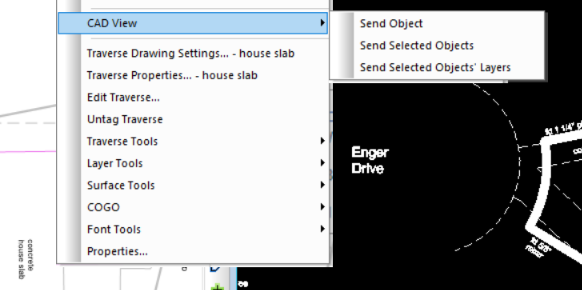
Select the object or objects you want to send, then right-click any of those objects and choose CAD View. Select the appropriate action from the context menu.
Send Object
Send just the object that was right-clicked.
Send Selected Objects
Send all selected objects, regardless of which object was right-clicked.
Send Selected Objects' Layers
Send all the layers represented by any selected objects. This allows you to send entire layers over to the CAD View by selecting one or more objects on that layer.
Using Calibrations
If you have calibrated a CAD file to your survey, TPC associates that CAD file with that calibration. This applies to sending drawing objects to the CAD View.
If you have calibrated the current CAD View drawing to your survey, TPC can now use that calibration to forward calibrate CAD entities from the CAD View to the Drawing View or reverse calibrate drawing objects from the Drawing View to the CAD View.
Calibration Association (5:36) - Associating a DWG file with a calibration lets us work seamlessly between the Drawing View and the CAD file.