|
Use this command to save an imported drawing block, that doesn't have a filename, to a block file. New in TPC Desktop 2025
From the Block Properties Dialog
You can save an imported block from it's Properties dialog
•right-click the block you want to save and choose Properties...
•Use the Browse button to provide a location and filename for the block
•Choose Save

Once the block has been saved, TPC will then store the block's pathname in the survey file instead the complete block definition. This makes survey files smaller.
From the Drawing Data Manager
•Expand the Blocks node
•Identify the block you want to save - if you expand it, it will not have a filename
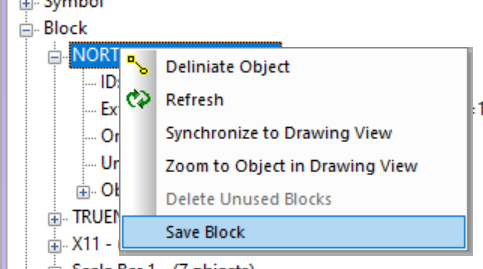
•Right-click the block and choose Save Block
•In the dialog, enter a path and filename or use the [Browse] button to browse to the folder you want to save the block in and enter a filename
Once the block has been saved, TPC will then store the block's pathname in the survey file instead the complete block definition. This makes survey files smaller.
Related Topics
Inserting Blocks
Converting Blocks to Groups
Creating Blocks
Editing Blocks
Storing Blocks in the Drawing
Editions
Premium, Professional
|

