Because TPC stores its blocks in the DXF file format, it can reuse the blocks you are currently using in other CAD programs. You don't have to walk away from the hours you invested in getting your stamp, company logo or favorite point symbols into your CAD drawings. TPC will extract them for you and help you organize them into folders, making them easier to reuse.
Open a drawing in your current CAD program and insert the blocks you use most often. You may already have these loaded in your default drawing or you may have them in a template drawing (TPC will create a reusable block for each block it finds in this drawing - so include the ones you think you will use). You can repeat this process later on with other blocks, so you don't have to get them all the first time.
Export the drawing as a DXF file
Use the AutoCAD R12-R14 DXF formats if possible, but most variations of DXF files will work.
You can use TPC's CAD View to open any CAD file and save it as a DXF.
Extracting the Blocks
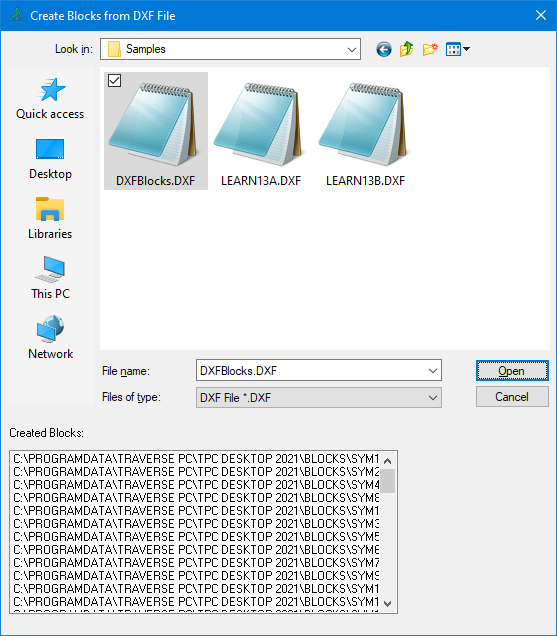
•From the Drawing View, choose Tools | Get Blocks From File. This will display the 'Create Blocks from DXF File' dialog.
•Locate the DXF file you exported from your CAD program and double click it or highlight it and choose Open.
TPC will display the blocks it creates in the 'Created Blocks:' window. It places these blocks in TPC's \BLOCKS\ folder.
Each block extracted from your DXF file gets its own block file, using the block name as the file name and appending the DXF file extension.
Some of the blocks created may be components used in other blocks. That's okay. You are not likely to insert these component blocks by themselves, but TPC still needs each one to have its own block file in order to recreate other blocks that use those components.
•Look over the block names, then choose Cancel.
That's it. TPC just got your blocks for you and now you are ready to use them in your TPC drawings. We recommend that you take a few minutes now to organize these blocks into folders, but you don't have to.
CAD Block Layers
CAD allows the entities in a block reference to be on their own layers, unique from the layer their block reference is on. TPC allows this also. See Block Layers.
Organizing the Blocks
TPC gives you lots of help in organizing and using blocks in your drawings. It maintains an object library for the blocks with folders that help you remember which blocks are which and where you put them. For more information on organizing your blocks see Object Library.