|
TPC lets you relabel points in a traverse. You can relabel all the points in the traverse or just selected points.
You might relabel points to make the point labels compatible with the data collector you want to export the points to, or you might have combined several surveys that use the same point numbers.
Whatever the reason, relabeling points is easy in TPC.
•Go to the traverse that has the points you want to relabel.
•If you plan on relabeling selected points, highlight the points you want.
•Choose Tools | Relabel.
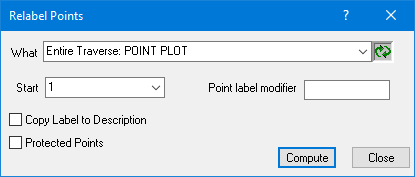
•You may also right click one of the selected points and go to Modify Points | Relabel points...
•Enter the starting label (the first selected point will get this label). You will have the chance to use the next available unbounded point number when you click OK.
•From the What list, choose the points you want to relabel.
•Choose Compute.
TPC relabels the first selected point to the starting number or label, then increments the label for each successive selected point.
If, after a point is relabeled, it has a colon in the label (i.e. 145:1), that indicates that the point label is already used and TPC had to add the colon and a number to make the new label unique. You might want to repeat the Relabel command with a different starting point.
Related Topics
Traverse View
Survey Point Labels
Relabeling Survey Points
Editions
Personal, Premium, Professional
|

