|
In this dialog, you can tell TPC do draw all the control lines for a traverse via a polyline and also smooth it.
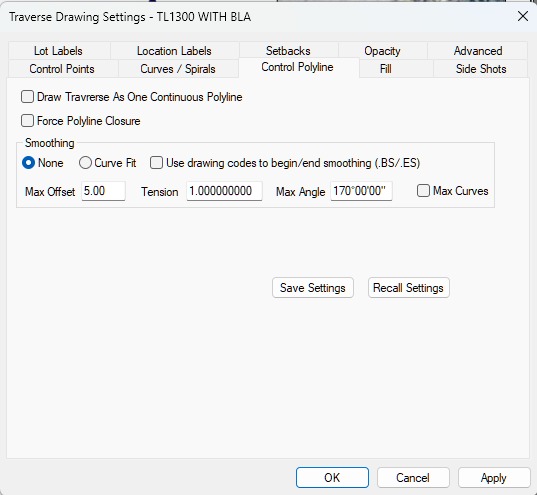
Draw Traverse as One Continuous Polyline
Turn this option On to draw the traverse as a polyline. Default = Off.
Force Polyline Closure
Turn this option On to force the resulting polyline to close (end where it starts) even if the traverse does not.
Smoothing
None or Curve Fit
Choose None to turn smoothing off (default). Choose Curve Fit to turn smoothing on.
Use drawing codes to begin / end smoothing (.BS/.ES)
Turn this option on to smooth individual sections of a traverse using the begin smoothing and end smoothing drawing codes.
Available only in the Professional Edition.
Max Offset
Specify the maximum amount from which a smoothed polyline segment will vary from its corresponding unsmoothed segment. The default is 5 units.
Tension
TPC uses the tension value you specify to compute the amount of curvature when fitting the polyline. A tension of 1.0 (default is 1.0) guaranties that no smoothed polyline segment will vary by more than the Max Offset from its corresponding unsmoothed segment. A tension of 0.0 turns off smoothing. Tensions between 0.5 and 2 are common.
When [x] Max Curves is turned on, the Tension value affects the curviness (default is 1.0).
Max Angle
Specify an interior angle above which no curve fitting will be done. This allows TPC to skip very flat vertices in the polyline.
Max Curves
Turn this option on to maximize the curves used to smooth the polyline. See Polyline Smoothing.
Related Topics
Control Polyline
Editions
Premium, Professional
|

