|
TPC stores its blocks using the DXF (Data eXchange Format) format used to exchange data with CAD programs. Each block file starts with a BLOCK command and ends with an ENDBLK command. The DXF format allows TPC to re-use blocks you may be currently using in another CAD program and share its blocks with other programs.
The following example is the 'Set Rebar' block.
0
BLOCK
8
0
2
Set_Rebar
70
64
80
50343936l
40
0.200000
10
0.000000
20
0.000000
30
0.000000
0
CIRCLE
8
0
62
7
6
CONTINUOUS
41
1
80
139280l
10
0.014668
20
-0.000000
30
0.000000
40
1.000000
0
ENDBLK
Notice that the block name (Set_Rebar) uses an underscore instead of a space. Within TPC, this block will be identified as 'Set Rebar'. TPC replaces the underscore with a space for internal use, but writes the underscore to the block file to maintain compatibility with AutoCAD.
You may also notice that TPC includes an '80' attribute with both the block and the CIRCLE entity. TPC stores information about the block and its entities in these values. TPC does not include these attributes in the BLOCK definitions when it writes a drawing to a DXF file. This ensures compatibility with CAD programs that may not allow this attribute.
Blocks Without Files
Blocks imported from a CAD file don't have filenames. This is because the block definition was contained in the CAD file itself. When TPC encounters one of these blocks, it also stores the block definition inside the drawing instead of a block file.
In the example shown here, the NORTH-TRUE block, inserted from CAD, does not have a filename. However, the Scale Bar block, inserted from TPC's object library, does have a file.

Saving CAD Blocks to a File
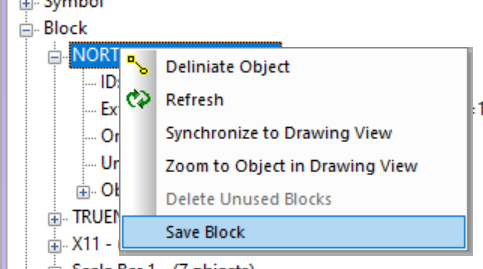
If you have imported a CAD block, like the NORTH-TRUE block shown above, you can save it to a file for re-use in other drawings.
•right-click the block name and choose and choose Save Block (new in TPC 2025)
•in the Block Reference dialog, browse to the location you want to save the block and save it
Related Topics
Object Library
Blocks
Editions
Personal, Premium, Professional
|

