|
These settings allows you to specify how data should be exported to a Bad Elf CSV file.
See Export Settings for settings not shown here.
Exporting Bad Elf CSV Files
•Choose File | Export, with Bad Elf (CSV) as the Type.
•To export traverses, choose this command from the Traverses Manager. You can export any or all traverses.
•To export points, choose this command from the Points Manager. You can export any or all survey points.
Note: Exporting with All selected from the Points Manager has the same effect as exporting with All selected from the Traverses Manager.
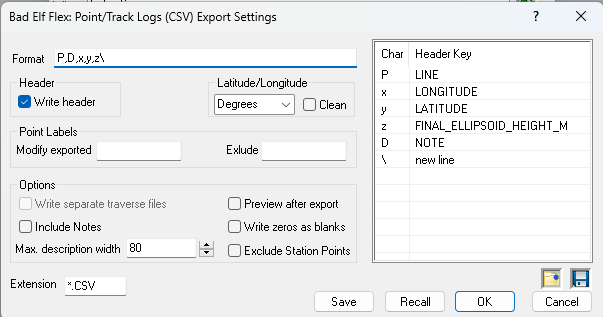 Export Format
TPC's GNSS export filters use many of the same format characters, but each manufacturer has their own header names. For format definitions, see GPS/GNSS CSV Files.
You can also have TPC write the header line which most manufacturers require for CSV files they import. See GPS/GNSS CSV File Headers.
See GNSS Export Settings dialog for fields not described here.
Use the Save and Recall buttons to mange different settings you want to use with your Bad Elf. See Save / Recall Settings.
Related Topics
Using GPS/GNSS
GPS/GNSS Data
Importing GNSS CSV
Exporting GNSS CSV
Save / Recall Settings
Editions
Premium, Professional
|

