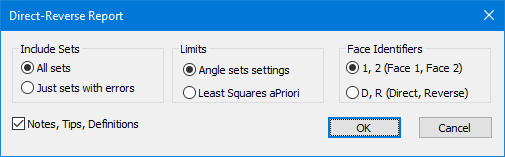
Navigation: Traverses > Ground Traversing > Using Data Sets > Traverse Direct-Reverse Report > Traverse Direct-Reverse Report dialog This dialog allows you to select the data you want to include in the Traverse Direct-Reverse Report. Include Sets Tell TPC to report all sets or just those with errors. Limits Choose the limits used to report sets with errors. Angle sets settings Use the limits you specified in the Program Settings, Angle Sets dialog. Least Squares aPriori Use the aPriori values specified for the survey's Least Squares or those stored with the traverse you are reporting. See Least Squares - Analyze. Face Identifiers TPC can report direct and reverse readings as B1, B2, F1, F2 where 1 & 2 refer to face 1 and 2 of the instrument. TPC can also report direct and reverse readings as BD, BR, FD, FR where D & R refer to the Direct and Reverse reads. Notes, Tips, Definitions Turn on this option to include information that helps identify what is included in the report and how to read it. OK Generates the report. Cancel Related Topics Traverse Direct-Reverse Report Copyright © 2026 Traverse PC, Inc.