|
Data sets are multiple observations that are meaned to get an average result. TPC allows you to enter sets for both side shots and foresights in the Traverse View. You can take as many sets as you like - the more sets, the better the mean.
Choosing Set Options
•Tools | Program Settings | Angle sets to display the Angle Sets dialog.
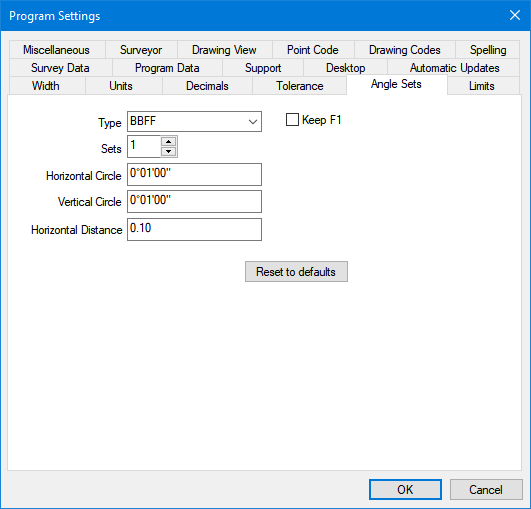
•Choose the set type you want to use. The set options in the list are explained later in this chapter.
•Choose [X] Keep F1 if you want to keep the face one measurement instead of the mean. If you turn this option on, TPC will still check the set to make sure it is within tolerance.
•Choose the number of sets you want to turn. It is easy to add additional sets in the Traverse View, so if you are unsure, leave this at 1
•Enter your allowed tolerances. If the computed mean is outside of these tolerances, TPC will display an error message when it computes the mean.
Entering a Set
The example shown here is a direction method (BFFB) set, where B1 and B2 are the normal and inverted backsight reading and F1 and F2 are the normal and inverted foresight readings. See Entering a Set.
B1=Normal backsight. (face 1)
B2=Inverted backsight (face 2)
F1=Normal foresight (face 1)
F2=Inverted foresight (face 2)
|
Point
|
Type
|
Data
|
|
1
|
|
|
|
2
|
BS
|
|
|
2
|
B1
|
|
|
3
|
F1
|
|
|
3
|
F2
|
|
|
2
|
B2
|
|
|
3
|
FSM
|
|
Notice that the letter ‘M’ is added to the mean FS type for point 3, indicating that the data is the “Mean” of a set.
|
Point
|
Type
|
Data
|
|
1
|
|
|
|
2
|
BS
|
|
|
3
|
F1
|
|
|
3
|
F2
|
|
|
2
|
B2
|
|
|
3
|
FSM
|
|
Repetition Set Types
Repetition sets use the lower motion tangent screw or the hold button on the total station to turn the total station without changing the horizontal circle reading. The sequence of shots in a repetition set is important and always involves sighting the backsight with the lower motion and sighting the foresight with the upper motion. See Repetition Set Types.
Direction Set Types
Direction sets use only the upper motion tangent screw. A direction set consists of a normal and inverted reading to the backsight and a normal and inverted reading to the foresight. The order of the readings is not important. See Direction Set Types.
Multiple Sets to the Same Foresight
If you include more than one angle set to a foresight, the sets are meaned to create the FSM or SSM record. You can include as many sets as you like to a foresight or side shot.
Error: Set Tolerance
FS=3 Set #1
+/-Hc=0°04’30”
Error:Set Tolerance
FS=5 Set #2
+/-Hc=0°02’15”
Error:Set Tolerance
FS=6 Set #1
+/-Hc=0°02’00”
3 Errors
Checking Set Tolerances
Set tolerances are checked as you enter the set data. If the set is not within tolerance, the computer beeps and the set error is reported in a popup box. The mean will still be computed and displayed with the set.
If the set is out of tolerance, you can repeat the set measurements using the existing set records. A new mean will be computed and the tolerances checked again.
To check the tolerance of all the sets:
•Choose Tools | Recompute
Sets that are not within tolerance will be displayed in the preview error log.
Traverse Direct-Reverse Report
The Traverse Direct-Reverse Report provides information about every angle set in the traverse, or just those that have errors.
When multiple sets are taken to a foresight, each set reports its own means and errors, along with the mean for from all sets.
Related Topics
Traverse View
Entering Traverse Data
Entering Side Shots
Displaying Raw Data
Recomputing a Traverse
Entering a Set
Editions
Premium, Professional
|

