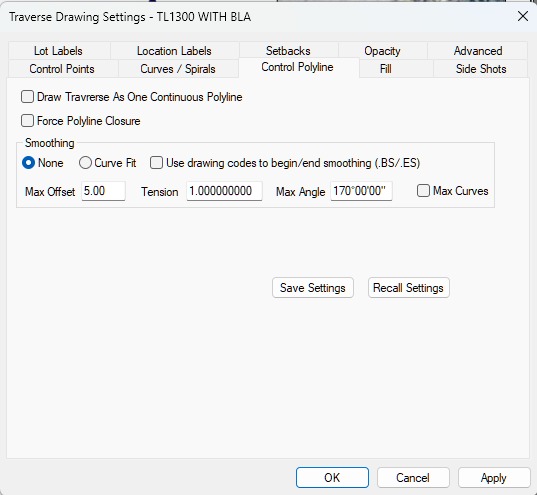
TPC can draw any traverse as a smoothed polyline with no coding required. It can draw control lines for any traverse as a single, continuous, polyline. Instead of individual line segments for each traverse course, TPC draws just one single polyline, formatted to match the traverse's tangents, arcs and spirals.
Smoothing with Max Curves (2:48) - Go from engineered smoothing like contours use to maximum curvature.
When to Use Traverse Smoothing
This can add a nice touch to certain boundaries like wetlands and vegetation that you want to represent in your drawings.
TPC uses the same smoothing routine it uses for contour smoothing, ensuring that the smoothed lines pass through the polyline vertices, making the smoothed polyline as accurate as possible by including the measured points.
Traverse Area
Smoothing a traverse does not affect the traverse area, which is still determined by the traverses survey lines, curves and spirals.
However, you can get the separate area of a smoothed traverse by right-clicking the smoothed polyline representing the traverse and choosing Properties. That dialog includes an area computation for the smoothed area.
If you want a traverse that has the smoothed traverse area, you can select the smooth polyline and Convert it to Survey.
Exporting Smoothed Traverses to CAD
Smoothed traverses are exported to CAD as a smoothed polyline.
Smoothing Part or All of a Traverse
You can choose to smooth entire traverse or just parts of a traverse using Drawing Codes .BS and .ES. See Smoothing Parts of a Traverse.
Smoothing parts of a traverse is available only in the Professional Edition.
Convert to Survey
Once a traverse is smoothed, you can convert the smoothed polyline it creates back to a traverse that has all the smoothed geometry and area.