|
You create a calibration from paired objects - one Uncalibrated and one calibrated. TPC uses these pairs to compute the calibration.
Using the Create Calibration Dialog
One way to create a calibration is through the Create Calibration dialog.
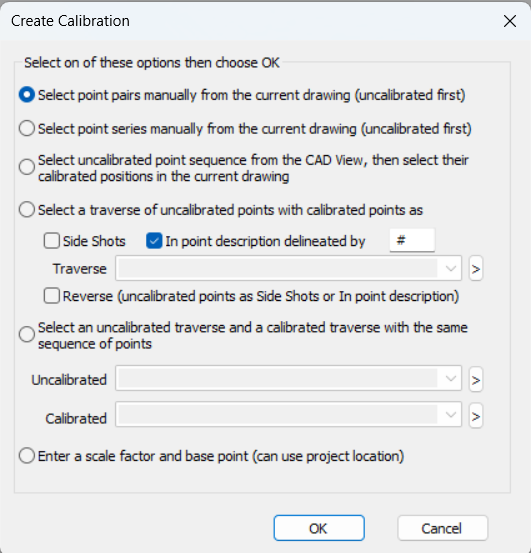
Select the option you want from this dialog, then follow the commands.
Select point pair manually from the current drawing
Select point series manually from the current drawing
Select uncalibrated point sequence from the CAD View, then select their calibrated positions in the current drawing
Select a traverse of uncalibrated points with calibrated points as Side Shots or In point description delineated by
Select an uncalibrated traverse with a calibrated traverse with the same sequence of point
Enter a scale factor and base point (can use project location) Starting in TPC 2022 R1
Calibration Commands
Calibration commands may allow you to select an existing calibration and create a new calibration.
Depending on how you create a new calibration, TPC will walk you through the process of selecting point pairs for the calibration.
Uncalibrated vs Calibrated Coordinate Systems
TPC uses the terms Uncalibrated and calibrated coordinate system.
Uncalibrated Coordinate System - this is the coordinate system being calibrated from.
Calibrated Coordinate System - this is the coordinate system being calibrated to. It will likely contain points that were created in that coordinate system. These points will never be calibrated because they originated in the calibrated coordinate system, but TPC will still refer to them as calibrated points.
Pairs vs Series
When you manually select calibrated and uncalibrated points to define a calibration, you can pick them in pairs or series. Picking points for calibration is available only when calibrating from the Drawing View and/or CAD View.
Pairs
When a calibration is small (short distances), you will want to pick points in pairs. Pick the uncalibrated point first, then the associated point you want it to calibrate to.
Series
When calibrations are large (long distances), you will want to pick points in series. Pick a series of uncalibrated points, then the associated series of points you want to calibrate to.
This option is the only one available when calibrating from the CAD View to the Drawing View.
Control, From, To
TPC uses the following terms to describe the point pairs used in a calibration.
TPC talks about calibrating from one calibration to another as calibrating from the Uncalibrated coordinate system to the Calibrated coordinate system.
Control
These are points in the calibrated system that provide the target (calibrated) positions for certain Uncalibrated points. This set of Uncalibrated / calibrated points are used to compute the calibration parameters.
So, if you have 5 Control points, you will have at least 5 From points.
From
These are Uncalibrated points that pair with the target points. If you have 5 Control points, you will have at least 5 From points. The first Control point pairs with the first From point and so on.
To
Each Uncalibrated From point generates a calibrated To point. The difference between the To point and the corresponding Control point is used to compute the standard errors of x and y for that point in the calibration report.
Minimum Point Pairs
Depending on the calibration type, a minimum number of point pairs are required.
For example, a 2D Conformal calibration can be computed from 2 points pairs, while a 2D Affine calibration requires 3 point pairs. The minimum number of point pairs has to do with the number of simultaneous equations required to solve the parameters for that calibration type.
All calibrations can accommodate additional point pairs, above the minimum, adding degrees of freedom to the least squares computation of the parameters and residuals.
Related Topics
Calibrating Data
Editions
Premium, Professional
|

