|
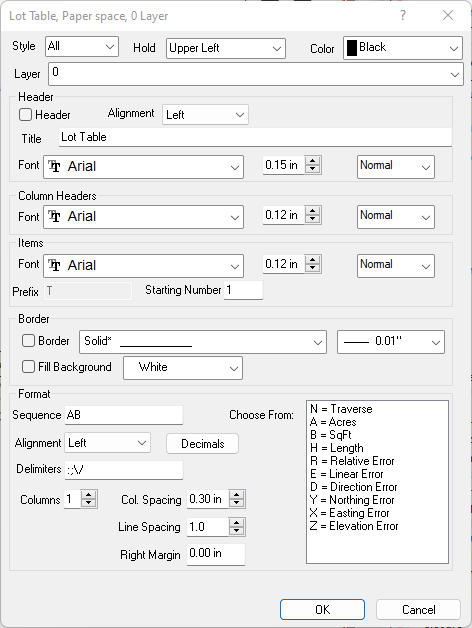
A Lot table allows you to include information about traverses (lots) that might otherwise clutter up a drawing. Any lot label in a drawing can be placed in a Lot Table where each row represents a labeled lot in the drawing.
Each drawing can contain only one lot table. For other drawing tables see Drawing Tables.
|
Lot
|
Name
|
Acres
|
SqFt
|
LinError
|
<- column headings
|
|
T1
|
Lot 1A
|
1.75
|
76,230.0
|
0.07
|
<- table item
|
Table Item References
The Point and Lot tables are unique in that in addition to creating references like P1, P2 for Points or T1, T2 for Lots, TPC can use the Point or Lot name as the reference. You will probably prefer this for the Point table and may want to consider it for the Lot table.e.
You determine how to reference them in the table dialog's Format field. Include the letter 'N' to add a column for the lot name in the table and TPC will reference the table items as T1, T2, etc. Omit the letter 'N' (default) and TPC will use the lot label as the reference.
TPC uses any prefix specified for the Lot and Point tables ONLY if they include the letters 'P' or 'N' respectively in their format Sequence. Using the Point or Lot name for the table items, precludes the use of table item prefixes.
Table Styles
Table styles determine how items are added to a table. The style can be All or Manual. You can start with one style, like All and have TPC add the appropriate table items, then switch the table to Manual and fine tune the selection of items.
All Style
With this style, all the lot labels are added to the table. Remember that a lot label has to appear in the drawing before it can be added to a table.
Manual Styles
For more control over the table items, choose the Manual Style. When a table style is set to Manual, you can append points in the order you want them.
•To add a point table, right click the label and choose Append to Table. TPC will compute the next table reference, replace the line label with the computed reference and append a new table item to the appropriate table. If you choose to append a label and the appropriate table doesn't exist, TPC will prompt you to create it and set its style to Manual.
Adding Your Own Table Data
You can add your own columns to tables - see Editing Table Items.
For a lot table, you might want to add a column for lot status or ownership.
Adding Extra Margin
You may find certain fonts will extend past the border of your point table.
An easy way to fix this is by adding some right margin to give your point table some extra width.
Related Topics
Drawing Tables
Line Table
Curve Table
Point Table
Lot Table
Labeling Drawing Objects
Smart Drawing Objects
Working with Drawing Objects
Drawing Commands
Editions
Premium, Professional
|

